


Context#
Kahf Kids is an Islamic education and entertainment app for children — curated YouTube videos, games, Quran, books, and courses behind a parent-controlled PIN — alongside a doctor-consultation surface (DocTime / Healthcare) that puts a VoIP call inside the app. I architected the original Flutter build, shipped it on Android, iOS, and Web, and ran it in production for about eighteen months while the user base grew.
The product contract is unforgiving. A child watching a video cannot leave that flow — no outbound link, no “open in YouTube,” no escape gesture. The parent’s trust depends on that boundary holding. And most of those parents are families in emerging markets on low-end Android: MediaTek Helio and entry-level Snapdragon SoCs, Mali-G52/G57 or PowerVR GE8320 GPUs, two to three gigabytes of RAM, often on intermittent 3G/4G. A parental-control promise that survives a five-year-old phone with a struggling GPU is the actual bar. Architecture decisions live or die on that hardware.
This page is the hub for the Kahf Kids Flutter story — what shipped, why it ran for ~18 months, why I migrated it, and what replaced it. The spokes go deep on each piece.
The setup — three targets, one codebase#
The Flutter build targeted three platforms from one Dart codebase: Android, iOS, and Web. Other platform folders appear in the repo because Flutter scaffolds them by default — they aren’t shipped targets, and I’m not going to claim breadth I didn’t deliver. Two Dart entry points wired the real targets: main.dart for mobile (Android and iOS), main_web.dart for the web build with the HTML renderer.
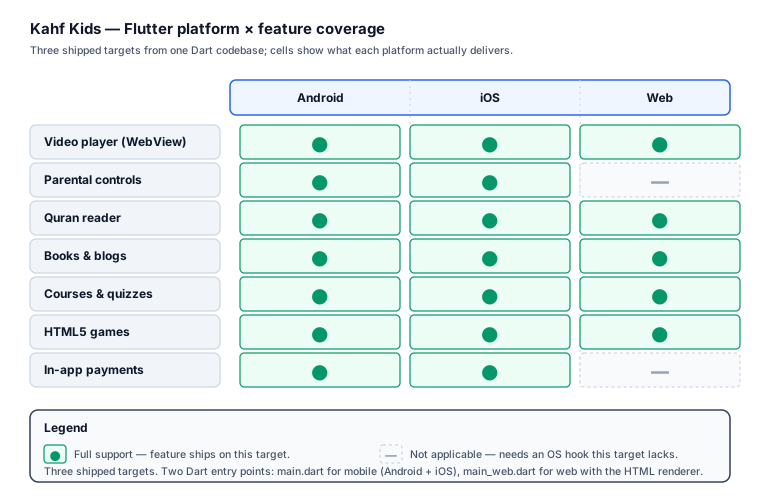
Content features — video, Quran reader, books, courses, HTML5 games — run on all three targets. The platform-specific pieces are the ones that need OS-level hooks: parental controls and in-app payments (Play Billing, StoreKit). Those are mobile-only by design — the web app serves content, not OS-level enforcement. A child on web watches inside the curated player; a child on mobile gets the full parental-control boundary because the OS gives us the hooks to enforce it.
The load-bearing flow is the player. Kids watch curated video inside a locked-in player surface that blocks every exit path — no outbound link, no “open in YouTube,” no escape gesture. A child pressing Back or swiping up stays inside the app. That boundary is what enforces the parental-control promise. It’s also what put a Flutter platform view in the hot path on cheap GPUs — which becomes important later.
The architecture — feature-sliced Flutter#
The codebase is feature-sliced. Each feature domain lives in its own folder, and most carry a common three-layer shape: one layer for state and orchestration, one for UI, one for local helpers. Heavier features add a platform-integration layer; lightweight content features collapse to a presentation layer alone. The slice grows with the feature, not to a template. A change inside one feature slice doesn’t reach sideways into another; blast radius stays inside the boundary.
Alongside the slices, the codebase maintains its own Dart packages — some published to pub.dev, some forked or derived from upstream — covering Quran text and audio, form-factor classification, analytics, a TV-navigable keyboard, and the drawing surface. A couple of upstream packages are forked and pinned, tuned to the app’s WebView and auth flows, and a parental-control plugin owns the platform policy the features call into. Keeping these as packages, not folders inside the app, is what kept them testable in isolation and swappable when the migration came.
I want to be honest about the shape. This isn’t a textbook four-layer Clean Architecture with separate domain/ and infrastructure/ folders on every feature — most slices don’t carry an infrastructure/ folder at all, and none carry a separate domain/ layer. It’s a pragmatic shape: the layers a feature actually needs, and no more. The Crewlix HR platform runs the full four-layer shape because HRM domain logic is heavy enough to earn it; Kahf Kids doesn’t, so it didn’t. If you want the contrast spelled out, it’s in the Crewlix clean-architecture deep dive.
The wiring around the slices is what you’d expect from a Flutter codebase of this generation:
- State:
hooks_riverpodwithriverpod_annotationand code generation, layered onflutter_hooksfor widget lifecycle. Providers are typed; the boilerplate stays out of the way. - Navigation:
auto_route^11.1.0 with codegen — type-safe routes, so a typo in a route name is a build error, not a runtime crash on a kid’s phone. - Models:
freezed+json_annotation. Immutable, copyable, union-ready. Removes a category of mutation bugs by construction. - Networking:
diobehindretrofit-generated API clients. - Firebase:
firebase_core,firebase_crashlytics,firebase_analytics, and messaging. Crashlytics is how I first saw the ANR clustering I’ll get to below. - UI:
cached_network_image,flutter_svg,iconsax_plus, andflashfor transient UI.native_device_orientationdrives the player rotation. - Payments & i18n:
flutter_inapp_purchasefor the stores;easy_localizationfor the locale matrix.
A couple of upstream packages are forked — I’ll describe them generically rather than by name. One exposes the player hooks the locked-in player surface needs (the upstream API was almost right, but the contract wasn’t quite ours). Another patches an edge case in the auth callback flow. Both are local path dependencies; both are the kind of fork you make when the upstream package is one PR away from doing what your product needs, and waiting on the maintainer isn’t on the roadmap.
The full architectural walkthrough — slice boundaries, the Riverpod provider patterns, the Auto Route tree, the two entry points, and how each feature’s three layers compose — is in the Kahf Kids Flutter clean-architecture deep dive.
Why I migrated — platform views and the TV gap#
Eighteen months in, Play Console vitals started showing foreground ANRs (Application Not Responding) clustered on a narrow but real slice of low-end Android devices with specific Mali and PowerVR GPU drivers. The signature was a main thread blocked on GPU work, with no Dart on the stack. No fix in pubspec.yaml reaches a failure like that.
The root cause is structural. Flutter platform views — the bridge that lets you embed a native View like a WebView inside a Flutter widget tree — require GPU context synchronization between Flutter’s Impeller/Skia render thread and the platform view hierarchy. On well-behaved drivers that handshake is fast. On certain Mali and PowerVR driver builds the fence stalls; both threads park; the main thread transitively blocks on a lock one of them holds. Five seconds, and Android’s watchdog fires the ANR. The mitigation Flutter shipped (Texture Layer Hybrid Composition) reduced the frequency but didn’t eliminate it across the device matrix. Put the video WebView underneath the parental-control overlay — exactly the worst-case shape — and you hit the worst path on the worst hardware. The full engineering breakdown, with the device matrix and the mitigations I tried, is in the platform-view ANR investigation.
The second trigger was the living room. Flutter’s Android TV support was not production-grade — focus handling, D-pad navigation, and platform-view behavior on TV chipsets were all unreliable. For a kids’ product where a meaningful chunk of engagement belongs on the family TV, that’s a structural miss.
Two structural failures, both at the platform-view layer, both on the hardware my users actually owned. The decision wasn’t fashion: the parental-control promise cannot survive a player that hangs, and TV was a roadmap commitment, not a “maybe in year two.” It landed on React Native with Expo. The full reasoning — including the options I weighed honestly against it (a native Kotlin player, bare RN, Kotlin Multiplatform) — is in the migration write-up.
Honest framing, because this isn’t an anti-Flutter verdict. Flutter was — and is — the right tool for products whose core flow stays inside Flutter’s canvas. I keep Flutter in production on the NCC app and the Crewlix HR platform because their load-bearing screens are pure-Flutter UI. Kahf Kids was different: its core flow is a video WebView with a Flutter overlay, and that’s the worst-case shape for this failure mode. Right tool, right product.
Outcome + reflections#
The React Native / Expo replacement shipped in three months — solo architecture with AI-assisted implementation. Video playback is stable across the device matrix that was ANR-ing before. The parental-control boundary holds on both mobile platforms and survived store review. The TV path is open without a rewrite. The full architecture of the replacement is in the RN/Expo rebuild deep dive.
Two honest reflections on the Flutter build.
First, I’d stop trusting platform views for anything load-bearing earlier than I did. I patched the video flow three times before admitting the issue was structural — not fixable in app code. That’s roughly six weeks I’d recover on a tougher project. The lesson, stated bluntly: if your product’s core flow is a platform view on low-end hardware, design the migration path on day one, not month eighteen.
Second, I’d move to the AI-assisted workflow sooner. Not because the tools are magic — because forcing yourself to write unambiguous task specs surfaces your own architectural vagueness before the code does. The three-month RN/Expo delivery was a direct result of that loop being tight. The Flutter build would have shipped cleaner and faster under the same workflow.
Frequently Asked Questions#
Why did Kahf Kids migrate off Flutter? Two structural reasons. Foreground ANRs clustered on Mali and PowerVR devices — Flutter platform views require GPU context synchronization between the Impeller/Skia render thread and the native view hierarchy, and certain closed-source driver builds on cheap Android hardware stall that fence. For a parental-control video flow, a hung player is a broken product, not a regression. Second, Flutter’s Android TV support was not production-grade. The full reasoning is in the migration write-up.
What Flutter architecture did Kahf Kids use?
A feature-sliced codebase. Each of thirty-plus feature domains lived in its own folder, most carrying three layers: one for state, one for UI, and one for local helpers. State was hooks_riverpod with codegen; navigation was auto_route with type-safe routes; models were freezed. Full walkthrough: the Kahf Kids Flutter clean-architecture deep dive.
Is the Flutter app still live? The Flutter build has been superseded by the React Native/Expo rebuild. The product itself is live on Android, iOS, and Web — kahfkids.com, Google Play, App Store — but the Flutter binary is no longer the shipping artifact.
What replaced the Flutter app?
A React Native + Expo app, delivered in three months with an AI-assisted workflow. Native bridges replace the Flutter platform view in the video flow, eliminating the GPU context-lock surface. An AccessibilityService on Android and Apple’s Screen Time framework on iOS handle parental controls through the OS-sanctioned paths. Architecture: the RN/Expo rebuild deep dive.
Would you ship Flutter again for a kids’ app? Yes — if the core flow stays inside Flutter’s canvas. The Crewlix HR platform and the NCC app both stay on Flutter because their load-bearing screens are pure-Flutter UI. The decision rule: if your core flow is video-, map-, or camera-heavy on low-end hardware and TV is on the roadmap, Flutter is the wrong fit; otherwise it’s a strong choice. The head-to-head: Flutter vs React Native vs Expo.
If you’re facing a similar call — a Flutter architecture that has to hold on cheap hardware, or a migration off platform views — get in touch.