


I’m Mohammad Jashem — a Senior Mobile Architect. This is the story of moving Kahf Kids off Flutter after roughly eighteen months in production: why the call was forced, what I rebuilt, and how it shipped in three months with an AI-assisted workflow. Not the marketing version — the engineering one.
The product contract is the load-bearing thing. Kahf Kids is an Islamic education and entertainment app for children — curated video, Quran, books, games, courses — all behind a parent-controlled PIN. The promise to the parent is that a child watching a video cannot leave that flow. No “open in YouTube,” no outbound link, no escape gesture. A frozen player is not a regression on a product like that — it’s a broken promise. The kid is stuck, the parent isn’t in the room, and trust evaporates. Every architectural decision lives under that contract.
Eighteen months in, Play Console vitals started showing foreground ANRs (Application Not Responding) clustered on a narrow but real slice of devices: Samsung A-series and Redmi Note handsets on Mali GPUs, Realme C-series on PowerVR GE8320s. The signature was a main thread blocked on GPU work, no Dart on the stack, no fix reachable from pubspec.yaml. Compounding it, Flutter’s Android TV support was not production-grade — focus handling, D-pad navigation, and platform-view behavior on TV chipsets were all unreliable, and the family TV was a roadmap commitment, not a “maybe in year two.”
Two structural failures at the platform-view layer, both on the hardware my users actually owned. The full failure-mode investigation — device matrix, stack traces, the mitigations I tried and what each one actually did — is in the platform-view ANR deep dive. This piece is the decision and the rebuild that came out of it.
The decision — two structural misses, one rewrite#
I don’t migrate on fashion. I’d shipped eighteen months of real revenue on Flutter, and the engine does a lot right on this product — for pure-Flutter UI (the home feed, the category grids, the book reader) Impeller paints smoothly on the cheap GPUs that dominate my user base. So I ran the analysis honestly, both directions.
The two structural constraints weren’t fixable in app code. The ANR lived at the intersection of three closed surfaces — Flutter’s platform-view composition logic, Android’s HardwareRenderer, and the OEM’s GPU driver blob — and on the devices dominating my emerging-market user base, that intersection was unfixable in any layer I owned. The mitigations were real but bounded:
- Texture Layer Hybrid Composition — the engine-level mitigation Flutter shipped for this class of bug. Reduced ANR frequency on Mali; did not eliminate it. On PowerVR the reduction was weaker.
- Forcing Virtual Display mode — patched the surface contention at the cost of broken touch input and accessibility in edge cases. Unacceptable for a parental-control overlay.
- A native Kotlin player behind a
MethodChannel— would have patched one surface while leaving the structural shape (a Flutter-rendered overlay above a nativeView) standing. One WebView flow patched, every other WebView flow (HTML5 games, books) still taxed.
And none of those gave me a real TV path. Staying meant shipping a known structural risk on the device matrix that dominated my user base, indefinitely. For a parental-control product, “ANRs less often” isn’t a product promise — it’s a regression tempo.
The options I weighed against migration:
- A full native Kotlin rewrite — doubles the team and kills iOS parity. Off the table for a three-month solo delivery.
- Bare React Native — fine-grained native control at the cost of the Expo toolchain. A trade I’d make if prebuild were fighting me, but on a greenfield rewrite prebuild is pure upside.
- Kotlin Multiplatform — didn’t solve the iOS/Web side cleanly for this product, and thinner on the module ecosystem I needed.
The full decision matrix — platform contracts side by side, framework tradeoffs in both directions — is in the head-to-head comparison of Flutter, React Native, and Expo. The decision rule I use is simple: if your product’s core flow is video-, map-, or camera-heavy on low-end hardware and TV is on the roadmap, Flutter is the wrong fit. If your UI stays inside Flutter’s canvas, it’s the right one. Kahf Kids was the first shape.
Honest framing, because this isn’t an anti-Flutter verdict. Flutter was — and is — the right tool for products whose core flow stays inside Flutter’s canvas. I keep Flutter in production on the NCC app and the Crewlix HR platform because their load-bearing screens are pure-Flutter UI. Right tool, right product. Kahf Kids was different: its core flow was a WebView under a Flutter overlay, and that’s the worst-case shape for this failure mode.
The rebuild — Expo ^57, React Native 0.86, TypeScript#
The replacement is React Native 0.86 shipped the Expo ^57 way, in TypeScript. The architecture lives in a monorepo: an expo-app/ shell, a separate tv-app/ for the living-room target, and twelve shared internal packages — analytics, api, domain, data, local-data, i18n, player, quran-ui, startup, crash-reporting, brand-assets, and tv-space-navigation — wired in as local file: dependencies. A fix in the domain or player package ships to both the mobile and the TV app. The full architecture walkthrough is in the RN/Expo rebuild deep dive; this piece is the migration logic.
The platform-view tax, removed#
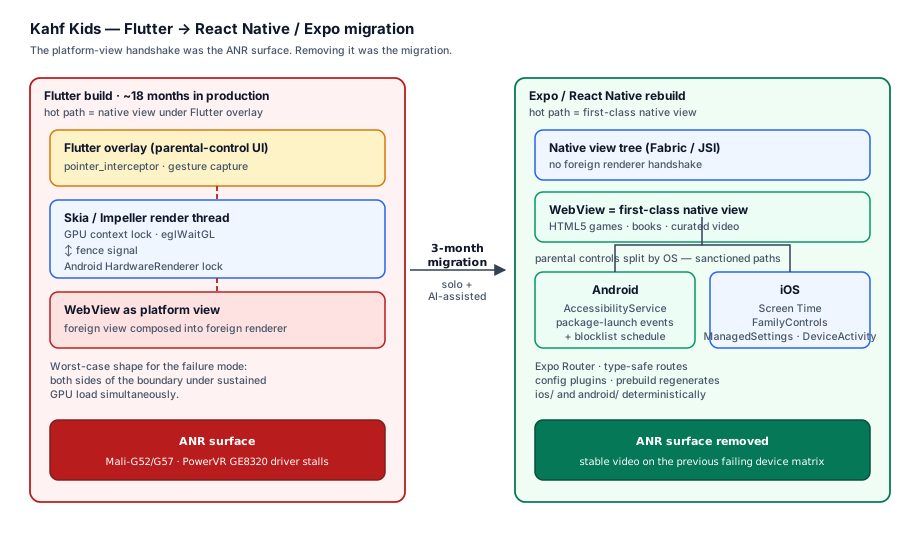
The load-bearing architectural change is the one the diagram is about. In Flutter’s composition model, a native View — a WebView, a map, a camera preview — is a foreign view composed into a foreign renderer. That’s the platform-view handshake that was stalling on Mali and PowerVR driver builds. In React Native’s view tree (Fabric renderer, JSI, TurboModules), a native View is already a first-class view. There’s no foreign-renderer handshake to stall.
The parental-control video flow that was hanging on the device matrix simply stops hanging — not because the new code is faster, but because the class of failure that was producing the ANR doesn’t exist in this architecture. That’s not a performance improvement; it’s a failure surface removed. The before/after is the whole story in one picture: same product contract, same device matrix, no more ANR cluster.
Parental controls split by OS#
Parental controls split by OS, because the sanctioned paths are different and there’s no upside in bridging them.
- Android —
AccessibilityService. Watches package-launch events and blocks apps on the blocklist against the parent’s schedule. The OS-sanctioned path for app blocking, and the one that survives Google Play’s accessibility-policy review with the correct prominent-disclosure flow. Not a clever workaround — the sanctioned path. - iOS — Screen Time framework. The only supported way to shield and time-limit a child’s device.
FamilyControlsfor authorization,ManagedSettingsto apply the shield,DeviceActivityto monitor schedules. There is no second path; Apple gives you one.
Two implementations, one parental-control contract. Neither side fakes the other platform’s API.
The toolchain#
The toolchain decisions are the ones that made the three-month timeline possible.
- Expo Router gives type-safe routes — a typo in a route name is a build error, not a runtime crash on a kid’s phone.
- Config plugins handle native behavior without a hand-patched Xcode project or a fight with Gradle.
expo prebuildregenerates theios/andandroid/native projects deterministically fromapp.json. The native project is an artifact, not a hand-maintained source of merge conflicts.- EAS Build produces signed iOS and Android artifacts in the cloud without me opening Xcode — a real lever when your user base is on flaky networks and you need a hotfix in hours, not weeks.
Where the WebView still lives#
The WebView didn’t disappear — it just stopped being load-bearing for the player. HTML5 games and books still render through a WebView because it’s the right tool for HTML content. The difference is architectural: the WebView is no longer the surface under the parental-control overlay in the hot path. The hot path is now a native bridge; the WebView is a content renderer elsewhere in the tree. Right tool, right place.
The TV path opens#
The TV path opened without a rewrite. Flutter’s TV gaps were blocking a living-room target; React Native’s react-native-tvos fork handles Apple TV, and Android TV works with native D-pad focus and remote key handling. Expo doesn’t add first-class TV support, but it doesn’t block it either — prebuild lets you wire in the TV targets when you need them without abandoning the rest of the toolchain.
The tv-app/ shell shares the domain, player, and analytics packages with the mobile app. The full TV architecture — including the spatial-navigation package that drives D-pad focus across the living-room UI — is in the RN/Expo rebuild deep dive.
The delivery — three months, AI-assisted#
Three months, solo architecture with AI-assisted implementation. I want to be precise about what that means, because “AI-assisted” gets used as a buzzword. The actual workflow is a tight loop:
- Decompose the system into tasks small enough to be unambiguous.
- Prompt with context loaded — the relevant architecture, the platform contracts, and the failure modes I’ve already shipped and patched.
- Generate against the spec.
- Review every diff — not line-by-line nitpicking, but checking it against the platform contracts, the architecture, and the known failure modes.
What the AI does. Generates React Native components, hooks, and screen wiring from the task specs. Writes TypeScript types from interface descriptions. Fills in the repetitive boilerplate — Expo Router route registrations, config plugin scaffolding, EAS Build configuration. Produces first-draft native bridge glue from documented API contracts. Runs refactor passes when I ask it to extract shared logic or rename across a module.
What I own. Product design and mobile architecture. The platform-contract decisions that determine whether a parental-control app survives store review on either platform. The CI workflows. Context engineering — the decomposition and the prompts. Review of every diff before it merged. Every debugging session — because when an AccessibilityService blocks the wrong package on a Samsung A-series handset, the AI doesn’t know which API is lying. I do. The parental-control boundary and release quality were never on the AI’s side of the ledger.
The three-month timeline isn’t a magic trick. It’s the direct result of that loop being tight. Generation time collapsed from hours to minutes per task; my review time per task stayed roughly constant — I was just reviewing more drafts in a week than I would have hand-written in a month. Same senior hours, more shipped code.
Outcome + reflections#
The production app is live on Android, iOS, and Web. Video playback is stable across the device matrix that was ANR-ing before — same content, same parental-control boundary, no more foreground hangs on the Mali and PowerVR handsets that dominated the vitals. Child-safety features are validated on both stores: the Android AccessibilityService path with its prominent-disclosure flow survived Google Play’s accessibility-policy review; the iOS Screen Time path survived App Review. The TV path is open without a rewrite.
Two honest reflections from the migration.
First, I’d stop trusting platform views for anything load-bearing earlier than I did. I patched the video flow three times before admitting the issue was architectural — not fixable in app code. That’s roughly six weeks I’d recover on a tougher project. The lesson, stated bluntly: if your product’s core flow is a platform view on low-end hardware, design the migration path on day one, not month eighteen.
Second, I’d have moved to the AI-assisted workflow sooner. Not because the tools are magic — because forcing yourself to write unambiguous task specs surfaces your own architectural vagueness before the code does. The discipline of decomposition is the actual lever; the generation speed is a side effect.
Takeaways#
- Distinguish jank from context-lock before you migrate. Dropped frames are a tuning problem; a five-second main-thread block on a GPU fence is architectural. The mitigations for the two are different, and only one of them is fixable in app code. The diagnostic is in the ANR deep dive.
- Migrate when the product contract is at risk, not when the framework is unfashionable. The parental-control promise cannot survive a player that hangs. If your core flow is video-, map-, or camera-heavy on low-end hardware and TV is on the roadmap, the structural risk is real. If your UI stays inside Flutter’s canvas, stay.
- The right-tool question is per-product, not per-team. I keep Flutter in production on NCC and Crewlix because their load-bearing screens are pure-Flutter UI. Kahf Kids migrated because its core flow was a platform view. The framework analysis is in the comparison.
- Move the WebView out of the hot path; don’t delete it. A native bridge replaces the platform view where it’s load-bearing. The WebView is still the right tool for HTML5 games and books — just no longer the surface under the parental-control overlay.
- Use OS-sanctioned parental-control APIs, not clever workarounds.
AccessibilityServiceon Android with the prominent-disclosure flow, Screen Time on iOS. Both survive store review. A cleverer path that bypasses either will not. - Decomposition is the lever in AI-assisted delivery, not generation speed. Three months came from writing unambiguous task specs that exposed my own architectural vagueness before the code did. The generation is a side effect.
If you’re scoping a Flutter → RN/Expo migration#
If you’re staring at platform-view ANRs you can’t patch from pubspec.yaml, a TV target that isn’t materializing, or a Flutter codebase structurally boxed in by its core flow — the cheapest thing you can do is scope it with a senior architect before you write a line of production code. The decision is rarely “should we migrate”; it’s “is the failure mode structural, and what does the rebuild look like.” Get in touch.