


I’m Mohammad Jashem — a Senior Mobile Architect. Kahf Kids is an Islamic kids’ education app I built in Flutter and ran in production for about eighteen months across Android, iOS, and Web: curated YouTube videos, Quran, books, games, courses — all behind a parent-controlled PIN. This is the architecture write-up. Not the marketing page — the engineering one.
The interesting part of Kahf Kids isn’t any single screen. It’s that the hot path is a YouTube WebView wrapped in a Flutter overlay that enforces the parental-control boundary, running on five-year-old Mali-G52 and PowerVR GE8320 GPUs with two to three gigabytes of RAM. When the hot path is a platform view under an input-capturing overlay on cheap hardware, every architectural decision lives or dies on whether you can reason about the boundary in isolation. If playback state leaks into the overlay, or the overlay reaches into the WebView’s gesture tree, the surface area you can’t test grows — and that’s where the ANRs eventually live.
The architecture is what made the boundary reason-able at all. Playback state sits in application/. The overlay sits in presentation/. The route guard sits in core/presentation/routes/. Each of those can be held in my head one at a time. That separability is what let me change the overlay three times chasing the ANR without rewriting playback, and it’s what made the eventual migration scope clean to draw. The full failure-mode investigation is in the platform-view ANR deep dive; this piece is about the shape that made the boundary tractable in the first place.
The product-level case study — what shipped, why it ran, why I migrated — is in the Kahf Kids Flutter app deep dive. This is the architecture deep dive.
The shape: feature-sliced, layers per feature#
Kahf Kids is feature-sliced. lib/ carries thirty-plus feature folders — parental_control, kids_webview, player, quran, games, website_blocking, books, blogs, course, quizzes, playlists, kahf_id, onboarding, calculator, search, history, settings, and a long tail. Each slice owns its surface end to end: UI, state, and any helpers it needs. A change inside parental_control can’t reach sideways into player; the blast radius of a bug stays inside the slice that introduced it.
The per-feature layer shape isn’t uniform, and I want to be honest about that because the pillar earned a review correction on the same point. The shape a slice carries is the shape it needs:
- Full three-layer (
application/+presentation/+shared/):parental_control,player. These are the slices with real state and real UI — a notifier for the schedule, a page that consumes it, a local helper for a permission mixin. - Heavier slices that add
infrastructure/:games,kahf_id,onboarding. They do platform work — HTML5 game packaging, identity flows, OS permissions — that the lighter slices don’t. - Lightweight content slices that collapse to
presentation/only:kids_webview,quran,books,blogs. They render content sourced from elsewhere; no local state worth naming. - Two-layer (
presentation/+shared/):website_blocking,quizzes. UI plus a small helper module. - Application + presentation, no
shared/:playlists. State and UI, nothing local worth extracting.
No feature carries a separate domain/ layer. This is not textbook four-layer Clean Architecture — it’s a pragmatic shape: the layers a feature actually needs, and no more. The Crewlix HR platform runs the full four-layer shape because HRM domain logic earns it; Kahf Kids doesn’t. The contrast is spelled out in the Crewlix clean-architecture deep dive.
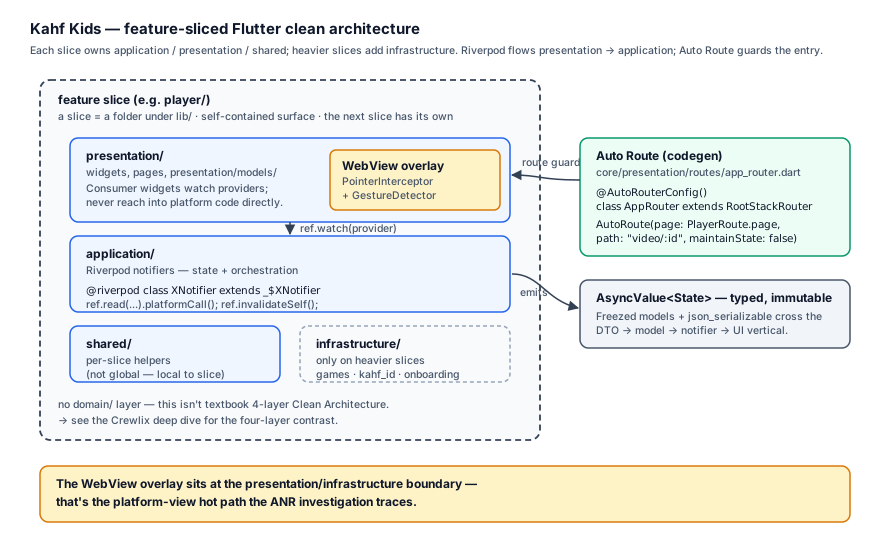
The reason this matters in practice is the boundary. The WebView overlay sits in the player slice. Playback state lives in player/application/. The route guard lives in core/presentation/routes/. The parental-control policy lives in a separate plugin and is read through parental_control/application/. Four pieces, four files, each reason-able in isolation. That’s the whole point of the slicing.
Layers: what each one owns#
application/ — state and orchestration#
application/ is where Riverpod providers live. Providers are declared with annotations and code-generated by riverpod_generator; notifiers own the state for their slice and the UI watches a provider and rebuilds when state changes. No setState sprawl, no global singletons.
A usage-limit notifier from the parental-control slice, redacted for length and with the dev logging stripped:
@riverpod
class UsageLimitNotifier extends _$UsageLimitNotifier {
  @override
  FutureOr<List<Schedule>> build() async {
    return ref
        .read(parentalControlManagerProvider)
        .getSchedulesByType(ScheduleType.usageLimit);
  }

  Future<void> createSchedule({
    required String scheduleId,
    required String name,
    required int limitSeconds,
  }) async {
    await ref
        .read(parentalControlManagerProvider)
        .createUsageLimitSchedule(
          scheduleId: scheduleId,
          scheduleName: name,
          usageLimitSeconds: limitSeconds,
        );
    ref.invalidateSelf();
  }
}
The provider is the entire public surface of the slice. The UI calls createSchedule; the notifier talks to the platform plugin; the state invalidates and rebuilds. Three responsibilities, one place. That’s the layer’s job.
presentation/ — UI and view state#
presentation/ holds the pages, widgets, and — when the slice needs it — a presentation/models/ subfolder for view-specific state. Consumer widgets read providers from application/; they don’t reach into platform packages directly. The parental-control page reads usageLimitNotifierProvider; the player view reads autoplayNotifierProvider and the YouTube controller provider. The layer knows about Riverpod and Flutter; it doesn’t know about the OS accessibility service except through the notifier in application/.
shared/ — helpers local to the slice#
shared/ is the per-slice helper folder: a permission widget mixin in parental_control/shared/, a providers barrel file, a small extension. This is the part that gets misread most often. shared/ is not a global utility layer. It’s local to the slice. The rule: if player needs a helper, the helper lives in player/shared/, not in core/shared/. The slice stays self-contained; core/ only gets things genuinely used by three or more slices.
infrastructure/ — platform work, only when earned#
The heavier slices — games, kahf_id, onboarding — add infrastructure/. This is where platform-specific work lives: HTML5 game packaging, identity token exchange, permission flows that talk to native APIs. Lightweight slices don’t carry this layer because they don’t need it. parental_control, despite being the most behaviorally complex slice, doesn’t have infrastructure/ — its platform work lives in a separate Flutter plugin, and the slice calls the plugin’s API through the notifier.
Navigation: Auto Route, code-generated and type-safe#
Routes are declared once and code-generated by auto_route, so navigation is compile-time safe. Pushing a route with the wrong argument type is a build error, not a runtime crash on a kid’s phone. The router itself is one file — core/presentation/routes/app_router.dart — declaring every page and deep-link path in the app.
A redacted slice of the router, showing the parental-control route and the player route — the two that carry the most architectural weight in this app:
@AutoRouterConfig()
class AppRouter extends RootStackRouter {
  @override
  RouteType get defaultRouteType =>
      RouteType.material(enablePredictiveBackGesture: true);

  @override
  List<AutoRoute> get routes => [
    // ...mobile-only and web-only routes gated on kIsWeb...
    AutoRoute(
      page: DashboardRoute.page,
      path: '/',
      children: [
        AutoRoute(
          page: ParentalControlRoute.page,
          path: 'app-guard',
        ),
        AutoRoute(
          page: PlayerRoute.page,
          path: 'video/:id',
          maintainState: false,
        ),
        // ...the rest of the deep-link tree...
      ],
    ),
  ];
}
The router is a single declarative tree. The parental-control page hangs off the dashboard shell at /app-guard; the player hangs off the same shell at /video/:id. maintainState: false on the player route is deliberate — every navigation to a video rebuilds the player from scratch, so the overlay state can never inherit stale playback state from the previous video. That single flag is part of the boundary contract.
Models: Freezed, end to end#
Every data model crossing the DTO → model → notifier → UI vertical is a Freezed class — immutable, with a generated copyWith, JSON serialization via json_serializable, and union support when a model has discrete states. A redacted slice of the video model:
@freezed
abstract class Video with _$Video {
  const factory Video({
    @JsonKey(name: 'video_id') required String videoId,
    @JsonKey(name: 'video_url') required String videoUrl,
    required String category,
    required String title,
    @JsonKey(name: 'channel_title') required String channelTitle,
    required String thumbnail,
    required String duration,
    @JsonKey(name: 'published_at') required DateTime publishedAt,
    @JsonKey(name: 'related_videos') required List<String> relatedVideos,
    @JsonKey(name: 'is_custom_video', defaultValue: false)
    required bool isCustomVideo,
  }) = _Video;

  factory Video.fromJson(Map<String, dynamic> json) => _$VideoFromJson(json);
}
The @JsonKey(name: ...) annotations are how the server’s snake_case keys map to Dart fields without polluting the model. The defaultValue flags are how the model survives a backend that occasionally drops a field — a real concern on a kids’ app where the content feed is partially curated and partially dynamic.
The case study: the WebView overlay as architecture’s hardest test#
The parental-control video flow is where every architectural choice pays off or breaks. The shape is precisely the worst-case one for a Flutter app: a YouTube WebView plays the video, a Flutter overlay rendered above it captures the surface and blocks every exit path, and Riverpod holds the playback state somewhere underneath both.
The boundary in code, from the player overlay (redacted):
return PointerInterceptor(
  intercepting: kIsWeb && !isRunningOnTv,
  child: GestureDetector(
    onTap: isRelatedVideosVisible ? null : toggleOverlay,
    onVerticalDragUpdate: isLocked ? null : handleDragUpdate,
    onVerticalDragEnd: isLocked ? null : handleDragEnd,
    child: MouseRegion(
      onHover: kIsWeb ? (_) => showOverlay() : null,
      onExit: kIsWeb ? (_) => hideOverlay() : null,
      child: Stack(children: [ /* ...overlay layers... */ ]),
    ),
  ),
);
PointerInterceptor from pointer_interceptor is the load-bearing widget here. Without it, the WebView — a native platform view — would swallow the gesture tree and the Flutter overlay’s GestureDetector would never fire. With it, the overlay intercepts taps and drags on the Flutter side and the WebView’s controls stay hidden behind it. flutter_inappwebview provides the surface; a forked youtube_player_iframe exposes the player hooks the overlay needs. The YouTube controller params explicitly disable the in-player controls (showControls: false, pointerEvents: PointerEvents.none) — the WebView is a video surface, not a UI.
The architecture is what makes this reason-able. The overlay sits in player/presentation/. Playback state sits in player/application/. The route guard sits in core/presentation/routes/app_router.dart. The parental-control policy sits in a Flutter plugin and is read through parental_control/application/. Four pieces, four files. None of them knows how the others are implemented. Each of them is independently testable.
Here’s the part that matters for the rest of the cluster. That overlay sits in the platform-view hot path by construction. A Flutter widget rendered above a native view is the worst-case shape for the GPU context-synchronization failure mode that eventually showed up as foreground ANRs on Mali and PowerVR handsets. The architecture made the boundary testable and the migration scope-able — it did not, and could not, fix the underlying platform-view contract. The full failure-mode investigation — the device matrix, the stack traces, the mitigations, and why they were bounded — is in the platform-view ANR deep dive. When you read that piece, the thing to hold in mind is: the overlay code above is what was sitting on the hot path when the ANR fired. The boundary let me change it; the boundary couldn’t save it.
Takeaways: how to slice a Flutter app#
- Start with three layers, drop the ones you don’t use. The textbook four-layer Clean Architecture adds a
domain/layer most apps don’t need. Start withapplication/+presentation/+shared/, addinfrastructure/only when there’s real platform work, and don’t adddomain/unless the domain logic is heavy enough to earn its own pure-Dart module. HRM, finance, anything with non-trivial business rules — yes. A kids’ content app — no. - Slice on the feature, not on the layer. A
state/folder at the root that holds every provider in the app is the wrong shape. The provider for parental-control schedules belongs inparental_control/application/, next to the UI that consumes it. The blast radius of a change stays inside the slice. - Keep
shared/per-slice until you have three callers. Resist the upward pull tocore/the moment two slices need a helper. Two is duplication; three is a pattern; extract on three.core/is a junk drawer the day you stop enforcing that rule. - A
WebViewoverlay is testable in isolation when the layer boundary holds. If playback state lives inapplication/and the overlay reads it through a provider, you can write a widget test that injects a fake provider and exercises the overlay’s gesture logic without spinning up theWebView. If the overlay reaches directly into platform code, that testability is gone. - Extract a package when a boundary earns it — not only for a second app. On Crewlix I extracted
crewlix_core,crewlix_auth,crewlix_people, andcrewlix_feedbecause a second production app consumed them. Kahf Kids keeps a different cut: in-repo Dart packages —couchkeys(a D-pad TV keyboard),equranandquran(Quran text and audio),youtube_streams,flutter_drawing_board,device_type,kahf_kids_analytics— plus forkedyoutube_player_iframeandflutter_web_auth, and aparental_control_managerplugin. There was no second app; the pressure that earned extraction here was a clean test boundary and a swap surface inside the one app. Same principle, different trigger: extract on pressure — a second consumer, a test boundary, a swap point — not on prediction. - Layering is overkill when the slice is one screen with no state. The
quranreader is apresentation/folder and that’s it. Forcing it into a three-layer template would have added two empty folders and zero value. The shape serves the feature; the feature doesn’t serve the shape.
If you’re scoping a Flutter architecture review#
The decisions in this piece — feature-sliced Clean Architecture, the per-feature layer shape, the boundary that lets a WebView overlay be tested in isolation — are the decisions I make on every Flutter build I take on. If you’re scoping a Flutter architecture review, weighing whether your slice shape is holding under new features, or staring at a platform-view failure mode you can’t patch from pubspec.yaml, get in touch. I do this work.
Frequently Asked Questions#
How do you slice a Flutter app into features?
Each feature — parental_control, player, quran, games, and the rest — owns its own surface end to end under its own folder, with its own application/, presentation/, and shared/ layers (and infrastructure/ only when there’s real platform work). A change inside parental_control can’t reach sideways into player; the blast radius of a bug stays inside the slice that introduced it.
Why does Kahf Kids skip the domain/ layer?
Because the content doesn’t earn it. Textbook four-layer Clean Architecture adds a pure-Dart domain/ module for heavy business rules — finance, HRM, anything with non-trivial logic. A kids’ content app doesn’t have that weight, so the layers a slice actually needs are application/, presentation/, shared/, and infrastructure/ when platform work demands it. The Crewlix HR platform runs the full four-layer shape because HRM domain logic earns it.
How does the WebView overlay test in isolation?
When playback state lives in player/application/ and the overlay reads it through a Riverpod provider, you can write a widget test that injects a fake provider and exercises the overlay’s gesture logic without spinning up the WebView. If the overlay reaches directly into platform code, that testability is gone — which is the whole point of holding the layer boundary.