


I’m Mohammad Jashem — a Senior Mobile Architect. This is the architecture deep dive for the React Native / Expo rebuild of Kahf Kids, the Islamic kids’ education app I migrated off Flutter after roughly eighteen months in production. The product is the same — curated video, Quran, books, games, courses, and a doctor-consultation feature (Healthcare / DocTime), all behind a parent-controlled PIN — and the device matrix is the same: low-end Android handsets with Mali and PowerVR GPUs that the Flutter platform-view hot path was ANR-ing on. The architecture underneath is new. This piece is the engineering write-up of that new shape: one React Native / Expo codebase and a shared monorepo package set targeting five platforms — Android, iOS, Web, Android TV, and web TV.
The decision to migrate is documented separately; the Flutter architecture I migrated from is documented separately too. This spoke is what sits underneath the shipping product now: the monorepo layout, the mobile branch, the web branch, and the TV branch — including the forked spatial-navigation layer that turned the TV target from a Flutter dead-end into a production-ready path.
Two structural wins drove the call. The platform-view handshake that was producing foreground ANRs on the Mali/PowerVR device matrix does not exist in React Native’s view tree — the ANR investigation has the full failure-mode analysis. And the TV target that Flutter could not get production-grade works in React Native because the spatial-navigation layer is ours to build, not a closed engine’s to maybe-ship. That second win is the whole reason this spoke is the densest of the cluster.
The contract carried, the constraint added#
The parental-control contract is the one the Flutter build enforced: a child watching a video cannot leave that flow, and the parent’s trust lives on low-end Android hardware in emerging markets. That contract comes with two pieces of OS-level machinery that have to be wired through sanctioned paths — Android’s AccessibilityService and Apple’s Screen Time framework — and the migration had to keep both intact. It did. The Android accessibility path with its prominent-disclosure flow and the iOS Screen Time path (FamilyControls, ManagedSettings, DeviceActivity) survived store review on the rebuild the same way they survived it on the Flutter build. The migration reasoning is in the migration write-up.
The new constraint was the living room. Flutter’s Android TV support was not production-grade — focus handling, D-pad navigation, platform-view behavior on TV chipsets were all unreliable. For a kids’ product where meaningful engagement belongs on the family TV, that was a structural miss, not a nice-to-have. The rebuild had to treat TV as a first-class target from day one, not a roadmap item. That requirement is what pushed the architecture toward a monorepo with a dedicated TV shell, instead of a single app with TV views bolted on.
Monorepo + shared internal packages#
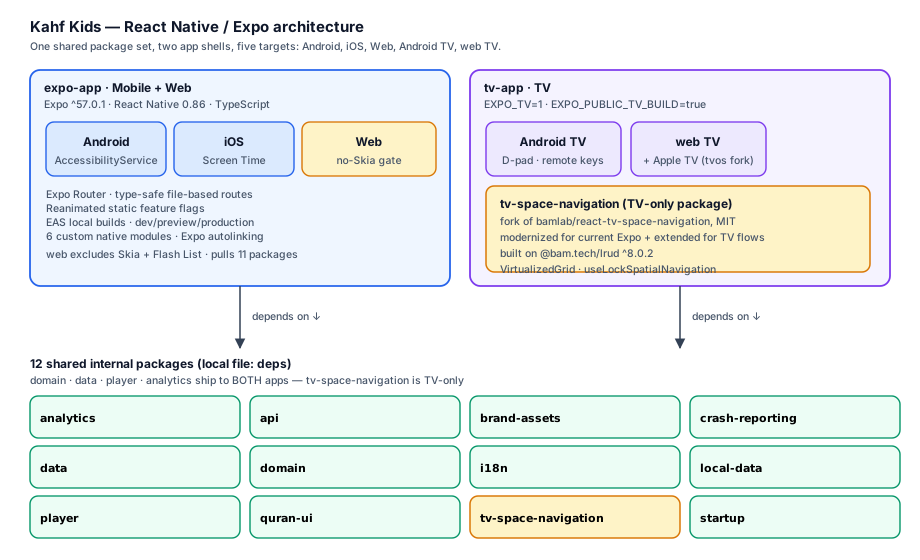
The codebase is a monorepo. One mobile-and-web shell, one TV shell for the living room, and twelve shared internal packages wired in as local file: dependencies:
domain— pure business logic. Entities, value objects, validation. No React, no platform code. Identical on every target.dataandlocal-data— server-state and on-device persistence. TanStack Query for server state, Drizzle ORM over SQLite for local.api— axios-based API client, shared between mobile and TV.player— the curated-video player contract both apps implement.analyticsandcrash-reporting— Openpanel and Firebase Crashlytics abstractions, so a fix to event schema ships to both apps.i18n— locale resources and i18next config.quran-ui— Quran reader components shared between mobile and TV.startup— app-initialization sequence shared across shells.brand-assets— logos, colors, fonts.tv-space-navigation— TV-only. The forked spatial-navigation package (covered below).
Most of those packages ship to both apps. The split is asymmetric and deliberate: the mobile shell pulls eleven of them, the TV shell pulls twelve — the same eleven plus tv-space-navigation. A fix in domain or player ships to mobile and TV together. The view layer and the navigation layer are where the two apps diverge: Expo Router file-based routes in the mobile shell, a separate TV route tree in the TV shell (with (main), watch, playlists, quran branches and a TV-specific sidebar focus system). Drizzle for the local DB, TanStack Query for server state, Hookform with @hookform/resolvers for the parent-settings flows. The state contract is shared; the screen shapes are not.
Mobile branch — the mobile shell#
The mobile shell runs Expo ^57.0.1 on React Native 0.86 in TypeScript (app version 4.0.0). Expo Router gives file-based, type-safe routes — a typo in a route name is a build error, not a runtime crash on a kid’s phone. The route tree is file-based, with _layout files composing the navigation hierarchy and the parental-control route guard gating the kid-facing flows behind the parent PIN.
Animations are Reanimated, configured with static feature flags so the worklet UI-update path is deterministic across the cheap-device matrix. The flags I set, in package.json under reanimated.staticFeatureFlags: ANDROID_SYNCHRONOUSLY_UPDATE_UI_PROPS, IOS_SYNCHRONOUSLY_UPDATE_UI_PROPS, FORCE_REACT_RENDER_FOR_SETTLED_ANIMATIONS, USE_SYNCHRONIZABLE_FOR_MUTABLES, USE_COMMIT_HOOK_ONLY_FOR_REACT_COMMITS. These are public Reanimated API names, and the combination is what stops an animated player overlay from dropping a frame on a Helio-class SoC while a video is decoding underneath it.
Builds run through EAS locally — eas-cli ... --local — with development, preview, and production profiles for both Android and iOS, plus --clear-cache variants for the cases where a stale Gradle or CocoaPods cache is fighting a native-module change. Local builds matter here: the signing material never leaves the workstation, and the build runs on hardware I control. Six custom native modules (the parental-control module, plus callkit-telecom-lite, home-shortcuts, launch-intent, rich-notifications, video-fullscreen-orientation) are wired in through Expo autolinking. Patches ride patch-package, drawing from a shared patches folder at the repo root plus a local patches folder per app — so a fix to an upstream dependency that both apps need lives once at the root.
Parental controls split by OS#
The parental-control module splits cleanly along the OS-sanctioned boundary:
- Android —
AccessibilityService. TheAppBlockerServicewatches package-launch events and blocks apps against the parent’s blocklist and schedule. Kotlin. This is the OS-sanctioned path for app blocking, and the prominent-disclosure flow is what survives Google Play’s accessibility-policy review. - iOS — Screen Time.
FamilyControlsfor authorization,ManagedSettingsto apply the shield,DeviceActivityto monitor schedules. Swift. Apple gives you one path; this is it.
Two implementations, one parental-control contract. Neither side fakes the other OS’s API.
Native modules and the package set#
The native-module story is the part of the rebuild that did not have a clean off-the-shelf answer either. A dedicated modules directory carries six custom Expo native modules, autolinked through Expo autolinking. The parental-control module is detailed above; the other five cover OS hooks that the npm ecosystem either does not expose or wraps in a way that fights the rest of the app.
parental-control(Android + iOS) — theAccessibilityService+ Screen Time contract above.callkit-telecom-lite(Android + iOS) — VoIP incoming-call notifications, iOS CallKit + Android Telecom. A stripped fork of the publicexpo-callkit-telecomnpm package. Media and WebRTC removed, because this app’s call media does not run native — it runs in the Healthcare WebView (below). Registered under the upstream nameExpoCallKitTelecomso the AndroidManifest service declarations and the JSrequireNativeModule(...)calls stay byte-for-byte valid against the upstream API. This is the second “fork and trim” beat on the rebuild — same shape as the tv-space-navigation fork, different domain.video-fullscreen-orientation(Android + iOS) — locks the screen orientation while a video plays fullscreen.VideoFullscreenOrientationModuleon both sides (Kotlin + Swift). The orientation libraries on npm either overreach (forcing orientation app-wide) or underdeliver (not exposing the fullscreen-only lock this app needs).home-shortcuts(Android) — Android home-screen dynamic shortcuts. The launcher route is a dedicated screen. iOS pinning is a different contract; this module is Android-only on purpose.launch-intent(Android) — Android intent and deep-link routing. ExposesisLaunchedFromHistoryandisFreshDeepLinkIntentso the JS side can distinguish a cold-start deep link from a warm resume.rich-notifications(Android) — rich push notifications plus a tap-event emitter (NotificationTapEventEmitter,RichNotificationsModule). Needed for the notification payloads the marketing and retention flows push.
Healthcare / DocTime — the surface the cluster has not named#
Kahf Kids is not only the curated-video / Quran / books / games / courses surface. It also ships a doctor-consultation feature — Healthcare / DocTime — that puts a parent in a video call with a clinician from inside the same app, behind the same parental PIN. The Flutter side is a DocTime feature; the React Native side is a Healthcare feature screen. The call media runs in a Healthcare WebView rather than native WebRTC, because the telehealth vendor’s SDK is a web bundle and re-hosting it native was not worth the maintenance. The native callkit-telecom-lite module is what makes that WebView usable as a phone call: it wires the incoming-call system integration (CallKit on iOS, Telecom on Android) so a consult request rings the phone’s native incoming-call UI, and the WebView only handles the in-call media once the parent picks up. That division is why the module is a stripped fork — the upstream expo-callkit-telecom carries its own WebRTC media layer, and that layer is dead code in this app.
TV native module — tv-voice-search#
The TV shell carries its own native module: tv-voice-search, a TV-shell native module. Kotlin TvVoiceSearchModule for Android TV, plus a TvVoiceSearchModule.web.ts stub so the same TS import compiles for web TV (where the voice-search system integration is the browser’s, not the OS’s). The pattern — Kotlin implementation for Android TV, web stub for web TV — is the same env-flag TV-gating pattern the rest of the TV shell uses.
The package set — why the monorepo exists#
The twelve shared packages listed above are the reason the codebase is a monorepo. Mobile consumes eleven of them; TV consumes twelve (the same eleven plus tv-space-navigation). The shared layer is everything below the view — domain, data, player, i18n, and the rest — and the view layer is where the two shells diverge: Expo Router in the mobile shell, a separate TV route tree in the TV shell. A bug fixed in domain ships to mobile and TV together; a screen-shape change stays in the shell that owns the screen. The view diverges; everything below it does not. The callkit-telecom-lite fork above is the same pattern as the tv-space-navigation fork below — an upstream was almost right, the delta was ours to define, and a forked module under our control shipped faster than a wrapper around an upstream we did not own.
Patches: the crash and ANR fixes we carry#
The contrast that opened this piece — the Flutter platform-view ANR on the Mali/PowerVR matrix was unfixable below the app layer because it lived inside closed GPU driver blobs — has a positive version on the React Native / Expo side. The production ANRs and OEM crashes here live in open Kotlin and TypeScript we can reach, read, and patch. patch-package is how those fixes ship without waiting on an upstream release.
The mechanism runs in three layers. A root patches/ folder carries patches both apps need, applied with patch-package --patch-dir ../patches. Each shell has its own patches folder for app-local fixes. Patches are surgical diff files against node_modules/, regenerated on every dependency bump, each one carrying an in-source comment that explains the failure mode and the fix. Fourteen patches in total. The build and web patches (Drizzle driver types, Metro DependencyGraph, the Skia and file-system web builds) are plumbing — they exist, but they are not the story. The story is the crash, ANR, and navigation-bug patches.
react-native-screens+4.25.2— ANR.ScreenContainer.setFragmentManager()runs fromonAttachedToWindow, which Fabric invokes from Reanimated’s animation-frame mount flush. A synchronous fragment commit there blocks the UI thread and produced production ANRs. The patch setsneedsUpdate = trueandpost { performUpdates() }instead ofperformUpdatesNow(), deferring the commit off the mount flush.react-native-gesture-handler+2.32.0— crash on MIUI/Xiaomi. A long-standing Android framework bug: a multi-touchPOINTER_UParrives with a stale pointer index,IllegalArgumentException: invalid pointerIndex -1fires insideScrollView#onTouchEvent→MotionEvent#getY, and the app crashes. Tracked upstream at react-native-gesture-handler #3921 (PR #3642). The patch wrapsview.onTouchEvent(event)in a try/catch, swallows the stale-pointer event, and lets the gesture end cleanly.expo-splash-screen+57.0.2— crash on Android 12-13. Race condition: the splash exit listener can fire after the Activity pauses, hittingSurfaceControl.checkNotReleased()and crashing the app (Google issuetracker #242118185). The patch unregisters the listener before that race window can open.expo-application+57.0.0— race on the InstallReferrer connection.getInstallReferrerAsynchad an unsettled-promise race on the InstallReferrer client connection — the promise could fail to settle. The patch rewrites the path with anAtomicBooleanand a dedicated executor so the promise settles exactly once.expo-router+57.0.2— deep-link replay on Activity recreation. Restoring Android navigation state across Activity recreation when the JS process was still alive (swipe-from-Recents, then re-open) replayed the last deep-link route once on the next open. The patch skips the restore in that path. Marked in-source as a Kahf Kids patch.react-native-reanimated+4.5.0— log gating. ThesynchronouslyUpdateUIProps failedwarning is gated behindBuildConfig.DEBUG, so a caught exception in the synchronous UI-prop path does not spam production logs. This ties back to the Reanimated static feature flags in the mobile branch: the flags make the synchronous path deterministic, and the patch silences the warning when the path catches an exception in dev.
Three more patches round out the set without being crash fixes: react-native+0.86.0 sets allowFontScaling = false as the default for Text and TextInput, so huge system font scales on cheap devices don’t break the kids’ UI layout; expo-in-app-updates+0.12.0 is a native Kotlin patch to the in-app-updates module; @bam.tech/react-native-keyevent-expo-config-plugin+1.0.52 adds the #import "AppDelegate.h" guard so the TV keyevent plugin configures correctly.
Why patch-package and not fork-everything? The forked packages on this rebuild — tv-space-navigation below, callkit-telecom-lite above — carry changes too large for a patch file: extended public APIs, removed subsystems. The crash and ANR fixes are the opposite shape: surgical, upstream-trackable, a handful of lines per patch. patch-package keeps each fix attached to a specific upstream version, regenerates against the new version on a bump, and fails loudly if the underlying code has moved. That is the difference between an open-source ecosystem where the source is reachable and a closed one where it is not — the ANR investigation on the Flutter side is the negative-case write-up. The migration held for many reasons; this openness is one of them.
Web branch + the no-Skia constraint#
The web build is expo export --platform web, gated by a verify-no-skia-web-bundle.mjs script in a shared metro-config package that runs as the last step of web:build. The gate enforces what expo.install.exclude already declares in package.json: the web bundle must not contain @shopify/react-native-skia or @shopify/flash-list. Either one in the web bundle is a build failure, not a warning.
The reason is bundle size on emerging-market networks. Skia is a heavy native dependency; shipping it to a browser — to a parent on intermittent 3G/4G trying to load a kid’s app — is the wrong trade. The TV build includes Skia (next section) because a TV is on Wi-Fi rendering against a known chipset; the web build excludes it because a phone on a flaky network is the worst-case delivery target. The constraint is encoded at the install layer (expo.install.exclude) and re-asserted at the build layer (the verify script), so the gate holds even if a transitive dependency tries to pull either package back in.
Two supporting scripts round out the web branch. subset-icon-fonts.js subsets the icon-font families to the glyphs the app actually uses — a meaningful reduction when the full icon set spans multiple families. And a custom youtube-player-web build plus upload script handles the curated-video player on web. Apple targets are wired through @bacons/apple-targets.
The TV branch + the forked spatial-navigation layer#
This is the section that did not have a Flutter answer. TV is gated by env flags at build time: EXPO_TV=1 produces Android TV and Apple TV builds, and EXPO_PUBLIC_TV_BUILD=true produces the web-TV build. The EAS profiles encode this directly — development_tv, preview_tv, and production_tv extend the base profiles with EXPO_TV: "1" in the env block, so the same EAS command surface produces mobile and TV artifacts from one config. The Apple TV target pulls react-native-tvos (the 0.86-stable line) through an npm alias rather than mainline React Native, because Apple TV needs the react-native-tvos fork’s TV focus primitives.
The TV shell shares the same data layer as mobile — Firebase, Openpanel, Drizzle, TanStack Query — and the same domain, player, and analytics packages. The TV build includes @shopify/react-native-skia ^2.6.4, in deliberate contrast to the web no-Skia gate: the TV is on Wi-Fi rendering against a known chipset, and Skia earns its weight there. The TV route tree carries the living-room surfaces: a (main) shell with browse, search, playlists, favourites, history, quran, and settings routes; a watch/ branch with the TV video player; a playlists/ branch; and a quran/ sub-tree (reader, bookmarks, note, search, tajweed-rules) for the TV Quran experience. Watchtime-limit enforcement runs on TV the same way it runs on mobile — same domain package, different UI.
The fork — tv-space-navigation, built on @bam.tech/lrud#
Spatial navigation on TV is D-pad-driven: up/down/left/right/enter, with the LRUD (Left/Right/Up/Down) model the TV community has converged on. The package that powers it is a shared tv-space-navigation package. It is a fork of bamlab/react-tv-space-navigation — public, MIT-licensed — modernized for the current Expo line and extended for Kahf Kids TV flows. Built on @bam.tech/lrud ^8.0.2 as the spatial-index engine, with @bam.tech/react-native-keyevent-expo-config-plugin wiring the physical remote keys through Expo’s config-plugin path.
The fork rationale is plain. The upstream was almost right, but lagged the Expo generation we were shipping on and didn’t expose the hooks the Kahf Kids TV flows needed — sidebar focus trapping, grid-as-browse, parental-overlay lock. Forking was cheaper than wrapping, and the MIT license made it straightforward. The internal structure carries components/, context/, hooks/, helpers/, types/, a SpatialNavigator.ts core, and a configureRemoteControl.ts entry point for the remote-key contract.
The public API surface is the part the TV app builds against:
SpatialNavigationRootandSpatialNavigationNode— the root and per-focusable primitives that compose the spatial tree.SpatialNavigationVirtualizedListandSpatialNavigationVirtualizedGrid— the grid is what powers the YouTube-TV-style browse: rows of cards, D-pad moves cell to cell, the grid virtualizes so a long catalog doesn’t render flat.useLockSpatialNavigation— focus trapping. Used when a parental-overlay or modal is open, so a D-pad press can’t escape the modal into the underlying UI.configureRemoteControl(also exposed asSpatialNavigation.configureRemoteControl) — the D-pad/remote-key entry point. This is where the TV app wires physical keys to LRUD directions.SpatialNavigationDeviceTypeProvider— branches TV vs web-TV vs other, so the same component tree tunes its focus behavior to the device class.DefaultFocuscontext,useSpatialNavigatorFocusableAccessibilityPropsfor a11y, and aDirectionsre-export from@bam.tech/lrud.
The D-pad wiring in practice, redacted from the TV remote-control focus module:
import { Directions, SpatialNavigation } from '../tv-space-navigation';
import RemoteControlManager from './remote-control-manager';
import { SupportedKeys } from './supported-keys';

const KEY_TO_DIRECTION: Record<SupportedKeys, Directions | null> = {
  [SupportedKeys.Up]: Directions.UP,
  [SupportedKeys.Down]: Directions.DOWN,
  [SupportedKeys.Left]: Directions.LEFT,
  [SupportedKeys.Right]: Directions.RIGHT,
  [SupportedKeys.Enter]: Directions.ENTER,
  // media keys (play / pause / rewind / ...) are null — handled elsewhere
};

SpatialNavigation.configureRemoteControl({
  remoteControlSubscriber: (callback) =>
    RemoteControlManager.addKeydownListener((key) => {
      callback(KEY_TO_DIRECTION[key]);
      return false;
    }),
  remoteControlUnsubscriber: (listener) =>
    RemoteControlManager.removeKeydownListener(listener),
});
That is the whole contract: physical key → LRUD direction (or null for non-spatial keys) → the @bam.tech/lrud engine → the right SpatialNavigationNode gets focus. The grid browse, the sidebar focus system, the watchtime-limit overlay, the parental PIN modal — all of them compose out of that primitive set. This is the layer Flutter TV could not give us production-grade, and the React Native / Expo + forked-LRUD stack gives us without rewriting the data layer or the domain. The same domain and player packages that ship to mobile ship to TV unchanged.
Outcome + takeaways#
Five targets from one shared package set: Android, iOS, Web from the mobile shell; Android TV, Apple TV, web TV from the TV shell. Video playback is stable across the device matrix that was ANR-ing under Flutter — the platform-view handshake that produced the failure mode does not exist in this architecture, so the class of failure is gone, not just reduced. The parental-control boundary holds on both mobile platforms and survived store review. The TV path is production-ready without a separate codebase or a separate domain layer. The web bundle stays under the no-Skia gate.
Numbered takeaways from this build:
- Fork an upstream when it is one PR away from your contract. The spatial-navigation upstream was almost right; the delta was Expo-generation currency plus the focus hooks the TV flows needed. Wrapping it would have meant maintaining the wrapper and the upstream’s surface at the same time. Forking under MIT was cheaper, and the diff is now ours to ship on our timeline.
- Gate TV builds by env, not by repo.
EXPO_TV=1andEXPO_PUBLIC_TV_BUILD=truein the EAS profile env block produce TV artifacts from one config surface. A separate repo would have forced a second copy of the shared packages and let the domain layer drift; env-flag gating keeps the share real. - Encode the web-bundle constraint twice.
expo.install.excludekeeps Skia and Flash List out of the install graph;verify-no-skia-web-bundle.mjsre-asserts it at build time. One gate is a policy; two gates is a constraint that survives a transitive-dependency surprise. - Share the domain, diverge the view. Twelve shared internal packages, eleven consumed by both apps. The view and navigation layers are where mobile and TV differ; everything below that is common. A bug fixed in
domainis fixed once for five targets. - TV includes Skia; web excludes it. Same codebase, different delivery constraint. The TV is on Wi-Fi against a known chipset; the web build targets a phone on an emerging-market network. The dependency decision is per-target, not per-codebase.
- Write the native module when the npm package fights you. Six custom Expo native modules under a dedicated modules directory cover OS integrations that off-the-shelf wrappers either do not expose or wrap wrong —
AccessibilityServiceapp blocking, CallKit/Telecom VoIP integration, fullscreen-orientation lock, home shortcuts, deep-link routing, rich push. The Healthcare / DocTime split (native call system integration, web call media in a WebView) is what made the callkit-telecom-lite fork worth the maintenance.
If you’re scoping a React Native / Expo multi-target build#
The decisions in this piece — the monorepo split between mobile and TV shells, the env-flag TV gating, the forked spatial-navigation layer, the web no-Skia gate — are the decisions I make on every React Native / Expo build that has to hit more than one target. If you’re scoping a TV app build, weighing whether your Expo codebase can extend to Android TV or web TV without a rewrite, or deciding whether to fork an upstream package or wrap it, get in touch. I do this work.
Frequently Asked Questions#
Can Expo target Android TV?
Yes. Expo does not add first-class TV support, but it does not block it either. The Kahf Kids TV build uses EXPO_TV=1 at build time to gate the TV target, with @react-native-tvos/config-tv and the react-native-tvos fork handling Apple TV focus primitives. Android TV works through native D-pad focus and remote-key handling wired through @bam.tech/react-native-keyevent-expo-config-plugin, with the EAS profiles (development_tv, preview_tv, production_tv) extending the base profiles with the EXPO_TV env.
What is spatial navigation in React Native?
D-pad-driven focus management for TV UIs — up, down, left, right, enter, with an LRUD (Left/Right/Up/Down) engine tracking which focusable node currently has focus. The Kahf Kids TV app uses a forked react-tv-space-navigation package built on @bam.tech/lrud, exposing SpatialNavigationRoot, SpatialNavigationVirtualizedGrid for YouTube-TV-style browse, useLockSpatialNavigation for focus trapping inside parental overlays, and configureRemoteControl as the D-pad entry point.
Did you fork react-tv-space-navigation?
Yes. The internal tv-space-navigation package is a fork of bamlab/react-tv-space-navigation — public, MIT-licensed — modernized for the current Expo line and extended for Kahf Kids TV flows. Forking was cheaper than wrapping: the upstream was almost right, and the delta was Expo-generation currency plus the focus hooks the TV product needed (sidebar focus, grid browse, modal lock).
How do you keep the Expo web bundle small?
Two layers. expo.install.exclude in package.json keeps @shopify/react-native-skia and @shopify/flash-list out of the web install graph. A verify-no-skia-web-bundle.mjs script re-asserts the constraint at build time and fails the build if either package reaches the web bundle. A subset-icon-fonts.js script further reduces the icon-font payload to only the glyphs the app uses.
Why did you write custom Expo native modules?
Six modules under a dedicated modules directory cover OS integrations that off-the-shelf npm packages either do not expose or wrap in ways that fight the rest of the app: parental-control (Android AccessibilityService + iOS Screen Time), callkit-telecom-lite (VoIP incoming-call notifications, forked from the public expo-callkit-telecom with media stripped for the Healthcare WebView), video-fullscreen-orientation, home-shortcuts, launch-intent, and rich-notifications. The TV shell ships its own tv-voice-search module — Kotlin for Android TV, a web stub for web TV. All are wired in through Expo autolinking.
What is the Healthcare / DocTime feature?
A doctor-consultation product surface inside Kahf Kids. The Flutter side is a DocTime feature; the React Native side is a Healthcare feature screen. The call media runs in a Healthcare WebView because the telehealth vendor’s SDK is a web bundle, and the native callkit-telecom-lite module wires the incoming-call system integration (CallKit on iOS, Telecom on Android) so a consult request rings the phone’s native call UI.