


I’m Mohammad Jashem — a Senior Mobile Architect. Crewlix is an HR management app I built in Flutter and shipped to Google Play and the App Store: attendance, leave, employee profiles, and a social feed. This is the architecture write-up — not the marketing version, the engineering one.
The interesting thing about Crewlix isn’t any single screen. It’s that the architecture I chose for one HRM app turned out to generalize into a small platform. The same four Flutter packages now run a second production app. That didn’t happen by accident; it happened because the boundaries were drawn at the package level, not by convention. This post is about how those boundaries are drawn, what sits inside them, and the one feature — a feature-complete rich text editor in the social feed — where the real engineering lives.
If you want the product-level case study instead, it’s in the Crewlix product case study. This is the deep dive.
The package layout: feature slices, then extraction#
Crewlix is feature-sliced Clean Architecture. Each domain is a slice, and every slice has the same four layers:
- presentation — widgets, pages, routing for the slice.
- application — Riverpod notifiers and providers; the use-case orchestration.
- domain — entities, value objects, and the business rules. Pure Dart, no Flutter.
- infrastructure — data sources, Retrofit API clients, DTOs, external integrations.
Inside the app shell, the slices are folders: auth, time, leave, people, feed, card, alert, and the rest. Each one mirrors that four-layer shape. A change in leave can’t reach into feed because the slice’s public surface is its notifiers and models, nothing else.
Then there’s extraction. Not every slice became a package — only four did: crewlix_core, crewlix_auth, crewlix_people, and crewlix_feed. The rule I used: a slice becomes a package when a second consumer needs it. Auth, the shared core (networking, theming, utilities, error handling), the people directory, and the feed all qualified. Time, leave, and the HR-specific slices stayed in the app shell, because they’re Crewlix’s business and no one else’s.
That distinction matters. Packages aren’t a vanity layering exercise; they’re the seams along which a second product can attach. Draw them at the wrong granularity and you either over-share (the second app inherits HR logic it doesn’t want) or under-share (you duplicate auth and networking in every app).
One platform, two apps#
Here’s where the package decision paid off. A second production app — a different product, different domain — depends on crewlix_core, crewlix_auth, and crewlix_feed via path dependencies. It gets the same networking stack, the same auth flow, the same social-feed engine, including the rich text editor.
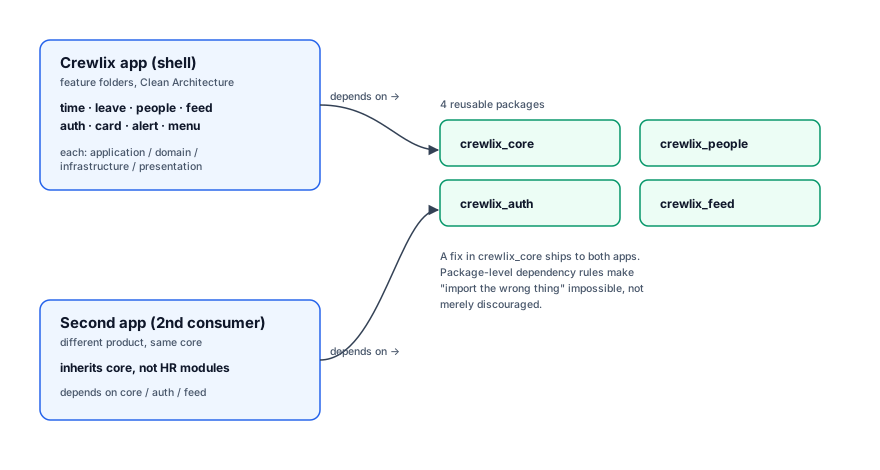
The dependency direction is enforced in the package graph, not in a CONTRIBUTING.md somewhere. crewlix_feed depends on crewlix_core. It cannot depend on crewlix_auth or on the app shell. If someone tries, the build fails. That’s the difference between an architecture that survives a year of new hires and one that quietly rots into a ball of mud.
The practical payoff: a fix to a networking bug in crewlix_core lands once and ships to both apps. The cost: a little more upfront plumbing, and the discipline to keep crewlix_core genuinely generic. The moment core grows a Crewlix-specific concept, the abstraction leaks and the second app pays for features it never asked for. Resisting that gravity is most of the ongoing work.
State, routing, and models#
Riverpod, with code generation. Providers are declared with annotations and generated by riverpod_generator, so they’re typed and the boilerplate is mechanical, not hand-written. Notifiers own the state for their slice; the UI watches a provider and rebuilds when the state changes. No setState sprawl, no global singletons.
A leave-balance notifier looks, in shape, like this:
@riverpod
class LeaveBalanceNotifier extends _$LeaveBalanceNotifier {
  @override
  Future<LeaveBalance> build(String employeeId) =>
      ref.read(leaveRepositoryProvider).fetchBalance(employeeId);

  Future<void> apply(LeaveRequest request) async {
    state = const AsyncLoading();
    state = await AsyncValue.guard(
      () => ref.read(leaveRepositoryProvider).submit(request),
    );
  }
}
AutoRoute for routing. Routes are declared once and code-generated, so navigation is compile-time safe. Pushing a route with the wrong argument type is a build error. For an HRM with deep links firing into arbitrary screens from notifications, that safety is worth more than it sounds.
Freezed for models. Every data model is a Freezed class — immutable, with a generated copyWith, JSON serialization, and union support. A leave request that’s draft | submitted | approved | rejected becomes a sealed union; the compiler enforces that every consumer handles every state. That single pattern removes a surprising amount of bug surface.
@freezed
class LeaveRequest with _$LeaveRequest {
  const factory LeaveRequest.draft({
    required String employeeId,
    required DateTime from,
    required DateTime to,
  }) = LeaveRequestDraft;

  const factory LeaveRequest.submitted({
    required String id,
    required String employeeId,
    required String approverId,
  }) = LeaveRequestSubmitted;

  factory LeaveRequest.fromJson(Map<String, dynamic> json) =>
      _$LeaveRequestFromJson(json);
}
Dio + Retrofit for networking. API clients are interfaces annotated with Retrofit and generated into implementations on top of Dio. The interface is the contract; the generated client is plumbing. Serializers come from json_serializable on the Freezed models, so the whole vertical — DTO → model → notifier → UI — is typed end to end.
The rich text editor: making flutter_quill power a social feed#
The social feed is where the engineering got real. Posts need bold, italic, headings, lists, inline @mentions, and embedded images — editable on a phone, with a toolbar, fast on long posts. Flutter doesn’t ship this. I built it on flutter_quill, whose document model is a Quill delta: a list of operations (insert "hello", format bold, insert image). The delta is the source of truth inside the editor. Everything else is conversion.
Why a delta, and why that creates a pipeline#
The server doesn’t store deltas. It stores posts as HTML (for rendering on the web) and Markdown (for portability). So the editor lives in delta-space and the server lives in HTML/Markdown-space, and every post crosses that boundary on the way in and out. That’s the pipeline:
- Delta → HTML:
vsc_quill_delta_to_htmlwalks the delta and emits HTML. - HTML → Delta:
flutter_quill_delta_from_html(theHtmlToDeltaconverter) parses stored HTML back into a delta when a post is opened for editing. - Markdown interop:
markdown_quillandhtml2mdbridge Markdown in and out for import/export and for the markdown editor surface.
The hard requirement is that the round-trip is lossless. A user edits a post, saves, opens it again, edits more, saves. If delta→HTML→delta drops a list nesting level or flattens a mention, the post silently corrupts on the second edit — and nobody notices until a user complains that their post “changed.” Getting that round-trip clean is most of the work, and it’s the part no package gives you for free.
Custom embeds: mentions and images as first-class citizens#
A mention isn’t text with an @ in front of it, and an inline image isn’t a URL in a paragraph. Both are embeds — distinct node types inside the delta, each with its own EmbedBuilder that knows how to render it, how to participate in selection, and how to move with the cursor. Because they’re embeds, not formatted text, you can’t accidentally place a cursor inside a mention or half-select an image. The editor’s behavior around them stays predictable.
Writing those embed builders — and wiring them into both the Quill editor and the HTML converters so they survive the round-trip — is fiddly, tightly specified work. Get it wrong and mentions vanish on save; get it right and they feel native.
Performance: don’t reconvert on every keystroke#
As a document grows, the naive approach — recompute the HTML-to-delta transform whenever the editor needs it — starts to stutter on long posts. The fix is caching: an HTML-to-delta cache keeps the expensive parse off the hot path, so typing stays responsive even on a post that’s been edited for twenty minutes. None of this is glamorous; it’s the difference between an editor that feels good and one that lags behind your thumb.
The shape of the conversion, simplified:
String deltaToHtml(Document document) {
  final delta = document.toDelta().toJson();
  final converter = QuillDeltaToHTMLConverter(
    delta,
    ConverterOptions(
      multiLineParagraph: true,
      customEmbedBuilders: [mentionEmbedBuilder, imageEmbedBuilder],
    ),
  );
  return converter.convert();
}
I’ll be blunt about scope: a feature-complete rich text editor in Flutter is genuinely hard, even starting from Quill. The packages get you a working editor in a day. The lossless delta↔HTML round-trip, the custom embeds, and the long-post performance take weeks. If you’re scoping one, budget for it — it is not a “drop in a widget” task.
What I’d do differently#
Two things, honestly.
First, I’d extract the packages even later than I did. There’s a temptation, once you’ve decided on Clean Architecture, to extract everything into packages on day one. That’s premature. You don’t know which seams a second consumer will actually need until there is a second consumer. I’d keep slices in the app shell until a concrete second product forces the extraction — then the boundaries fall in the right place because the pressure is real, not theoretical.
Second, I’d push more of the delta↔HTML round-trip into a test harness from the start. The corruption failures are silent and only show up after a save/open cycle. A property test that round-trips a corpus of deltas through HTML and back, asserting equality, would have caught regressions I instead found by hand.
Outcome#
Crewlix is live on Google Play and the App Store. The architecture has held as modules kept getting added, and the same package set now runs a second production app — which is the real test of whether the boundaries were drawn correctly.
If you want the product case study, it’s in the Crewlix product case study. If you want to see how this same package platform behaves at the seven-year horizon, the long-term maintenance write-up covers that. And if you’re choosing between Flutter, React Native, and Expo for an app of this shape, the head-to-head comparison is where I lay out the trade-off Crewlix loaded on.
Want this architecture in your app?#
The decisions in this piece — feature-sliced Clean Architecture, package extraction at the right boundary, and the rich-text-editor pipeline — are the decisions I make on every Flutter build I take on. If you’re scoping a Flutter architecture review, planning an HRM or social-feed app, or weighing whether your slice boundaries will hold under a second product, get in touch. I do this work.
Frequently Asked Questions#
What is Flutter clean architecture for an HRM app?
Feature-sliced Clean Architecture: each HRM domain — auth, time, leave, people, feed — is a slice with presentation, application, domain, and infrastructure layers, with dependencies enforced at the package graph. A change in leave can’t reach into feed because the slice’s public surface is its notifiers and models, nothing else.
When should I extract Flutter packages from a feature slice?
When a second consumer needs the slice. Crewlix extracted crewlix_core, crewlix_auth, crewlix_people, and crewlix_feed only after a second production app depended on them. Extracting earlier is premature — you don’t know which seams a second consumer will need until there is one. The right boundary falls out of real pressure, not prediction.
How do you handle a rich text editor in Flutter?
Build on flutter_quill and accept that the editor lives in Quill delta-space while the server lives in HTML/Markdown. A delta↔HTML↔Markdown pipeline (vsc_quill_delta_to_html, flutter_quill_delta_from_html, markdown_quill, html2md) handles the boundary, with custom EmbedBuilders for mentions and image embeds, and an HTML-to-delta cache to keep long-post editing responsive.